Connect Gemini, ChatGPT, Claude, DeepSeek, or OpenRouter directly to your live QGIS canvas. Download real-time satellite & OSM data, align CRS automatically, and execute multi-layer spatial workflows step by step.
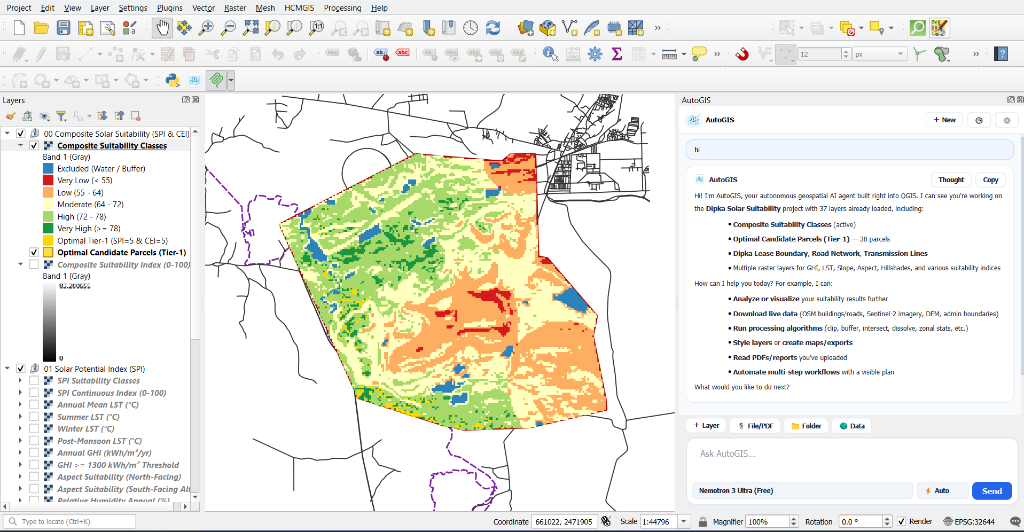
Automatically breaks large 30+ layer workflows into sequential phases (update_agent_plan), executing 1–2 tools per turn with 35ms UI pacing so QGIS stays responsive.
Audits Project CRS vs. Layer CRS (meters vs. degrees). Automatically reprojects EPSG:4326 layers to their local UTM Zone before buffering and aligns CRSs before spatial overlays.
Compact single-line project state serialization and sliding-window tool history compaction keep API token consumption minimal even on multi-layer projects.
Download administrative boundaries (Nominatim), live OpenStreetMap vectors (Overpass API), OSRM road routes, and STAC COGs (30m Copernicus DEM, 10m Sentinel-2, 10m LULC).
Attach 200+ page PDF reports, GeoPDF maps, Word (.docx), Excel (.xlsx), CSVs, or project folders with instant page pagination and keyword search.
Connect Google Gemini, OpenAI (ChatGPT), Anthropic (Claude), DeepSeek, or OpenRouter in one unified dialog with a <2s connection test and synced model dropdown.
AutoGIS.zip, and click Install Plugin.
https://raw.githubusercontent.com/sutharprin098/AutoGIS/main/plugins.xml
| Tool Name | Category | Parameters | Description |
|---|---|---|---|
| fetch_place_boundary | Live Data | place, layer_name, zoom | Geocode any city, district, state, or country via OSM Nominatim/Photon and load its polygon boundary. |
| fetch_osm_features | Live Data | category, place, bbox, custom_tag | Download live OpenStreetMap vectors (buildings, roads, rivers, water, railways, landuse, parks, hospitals, schools, power, boundary). |
| compute_road_route | Live Data | origin, destination, profile | Calculate shortest OSRM road route (driving, walking, cycling) with distance (km) and duration (min). |
| fetch_stac_earth_data | Live Data | dataset (dem | sentinel2 | lulc), place | Stream Cloud-Optimized GeoTIFFs (Copernicus 30m DEM, Sentinel-2 10m True Color, Esri 10m LULC) from Planetary Computer STAC. |
| list_saved_qgis_connections | Live Data | (none) | List saved XYZ Tile, WMS/WMTS (ISRO Bhuvan), WFS, and PostGIS connections in the user's QGIS profile. |
| load_saved_qgis_connection | Live Data | connection_type, name, typename | Load a map layer directly from the user's saved QGIS XYZ, WMS, or WFS connections. |
| read_uploaded_file_or_pdf | Documents | path, start_page, end_page, search_query | Paginate or search across large PDFs, load GeoPDFs to canvas, or parse DOCX, XLSX, CSV, GeoJSON, and folders. |
| update_agent_plan | Documents | title, steps[] | Create and update the live step-by-step phase checklist in the AutoGIS studio panel. |
| get_project_overview | Inspection | (none) | Inspect project CRS, units (meters vs degrees), canvas extent, active layer, all layers, and CRS mismatches. |
| list_layers | Inspection | (none) | List all vector and raster layers with IDs, geometry types, CRS, feature counts, and extents. |
| inspect_layer | Inspection | layer, sample_limit | Detailed inspection: vector field schemas & sample rows, or Raster Band Statistics (min, max, mean, std_dev). |
| query_features | Inspection | layer, filter_expression, fields, limit | Query features from a vector layer using a QGIS filter expression and optional WKT geometry output. |
| compute_field_stats | Inspection | layer, field | Compute count, min, max, sum, mean, median, std_dev, null count, and top unique values for a field. |
| evaluate_expression | Inspection | expression, layer | Evaluate any QGIS expression string against the project or a specific vector layer. |
| select_features | Inspection | layer, expression, zoom_to_selection | Select vector features matching a QGIS expression and optionally zoom to the selection. |
| spatial_buffer | Geoprocessing | layer, distance, dissolve, output_name | Create buffer zones with automatic metric UTM CRS reprojection when the input layer is in EPSG:4326 degrees. |
| spatial_overlay | Geoprocessing | operation, input_layer, overlay_layer | Run clip, intersection, difference, union, or dissolve with automatic CRS alignment between layers. |
| run_processing_algorithm | Geoprocessing | algorithm_id, parameters, output_layer_name | Run any QGIS Processing algorithm with invalid-geometry protection (GeometrySkipInvalid). |
| search_processing_algorithms | Geoprocessing | query, limit | Search the QGIS Processing registry by keyword to discover native, GDAL, GRASS, or SAGA algorithms. |
| get_algorithm_help | Geoprocessing | algorithm_id | Inspect parameter definitions, types, and documentation for any Processing algorithm ID. |
| style_vector_layer | Cartography | layer, style_type, field, palette, classes | Apply single, categorized, graduated choropleth, or point heatmap symbology. |
| configure_labels | Cartography | layer, enabled, field, font_size, halo | Enable and style text labels with halo buffers on vector layers. |
| add_basemap / load_dataset | Cartography | basemap / path, name, crs | Add XYZ web basemaps (OSM, Google Satellite, Esri, Carto, OpenTopoMap) or load local datasets. |
| create_memory_layer / add_features | Cartography | name, geometry_type, fields, features | Create scratch layers, add WKT features, compute fields, delete features, manage layer tree, or export layers. |
| execute_pyqgis / capture_map_canvas | Documents | code / width, height | Execute custom PyQGIS Python code on the main thread or capture a live PNG snapshot of the map canvas. |